Route Deposits Posted Previously to Groups and A/R Accounts
Stay allows users to route deposits previously posted to groups and A/R accounts using a routing rule. Previously, users could route only charges that were already posted to groups and A/R accounts.
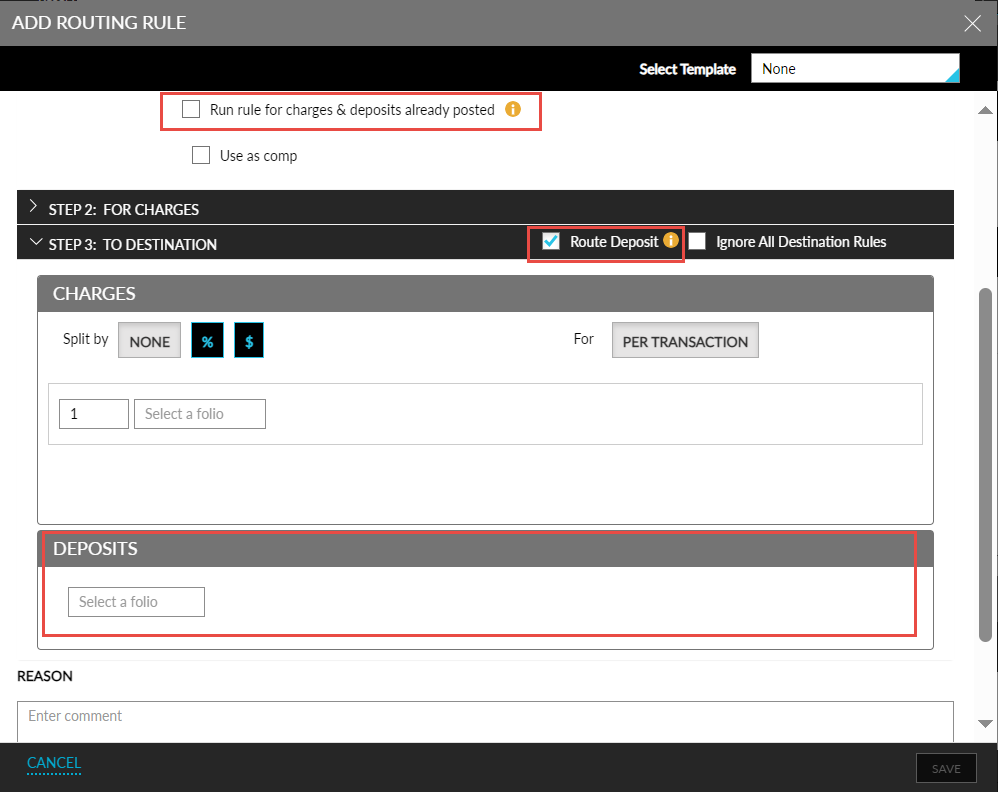
To use this feature, the Run rule for charges & deposits already posted checkbox in the following screens must be selected:
-
Group ➜ Folio & Routing Rules ➜ Group Account Rules ➜ Add/Edit account routing rule ➜ Rule Details.
-
Company Profile ➜ Accounts Receivable ➜ Default Routing Rule ➜ Custom Routing Rule ➜ Rule Details.
When this checkbox is selected, charges selected in the rule and the deposit already posted for the selected dates will be routed.
-
A Route Deposit checkbox is available in the To Destination section of the mentioned screens.
-
This checkbox is not selected by default.
-
When selected, a new section, Deposits, is displayed. Users can select a destination (folio or account) to route the deposits in groups from the drop-down list displayed in this section.
-
For A/R accounts, the deposit will be routed to the account.
-